
Today we are going to Supercharge our “First 3D Game” in Unity 🙂
To be more precise, we are going to improve our “Player Controller” code to add “Special Abilities” to our character such as “Dash“, “Double Jump“, “Run“, “Glide“, “Wall Run” and “Wall Jump“.
Unity Tutorial Level: Beginner-Intermediate.











2.1 Changing the Code.
Spoiler Alert “There’s a lot of Code coming” 🙁
In order to add double jump, dash, wall-run, glide, and dash abilities to our character (in addition to improving our basic movement), we’re going to completely overhaul our PlayerController code so it looks like the following (we’ve added as many comments as possible to help explain what each part does). So, let’s get started:
using UnityEngine;
using UnityEngine.InputSystem;
[RequireComponent(typeof(CharacterController))]
public class PlayerController : MonoBehaviour
{
// =================================================
// EDITABLE VARIABLES IN THE INSPECTOR
// =================================================
[Header("General Config")]
public float moveSpeed = 5f; // Base Movement Speed
public float jumpForce = 5f; // Normal jump force
public float risingGravity = -15f; // Force of gravity when jumping
public float fallingGravity = -25f; // Force of gravity when falling
public Transform cameraTransform; // Main camera transform
public float groundCheckRadius = 0.4f; // Ground detection radius
[Header("Components")]
public Transform groundCheck; // Object to detect ground
public LayerMask groundMask; // Layers considered as ground
[Header("Abilities")]
public bool canDoubleJump = false; // Double jump
public bool canDash = false; // Dash
public bool canWallJump = false; // Wall jump
public bool canWallRun = false; // Wall run
public bool canGlide = false; // Glide
public bool canSprint = false; // Sprint
[Header("Abilities Values")]
public float sprintSpeed = 10f; // Sprint speed
public float dashSpeed = 30f; // Dash speed
public float dashDuration = 0.15f; // Dash duration
public float dashCooldown = 0.75f; // Time between dashes
public bool allowAirDash = true; // Is air dash allowed?
public float wallJumpForce = 15f; // Wall jump force
public float wallRunGravity = 1f; // Gravity reduction during wall run
public float wallRunSpeed = 11f; // Speed during wall run
public float glideFallSpeed = -1.75f; // Falling speed during gliding
// =================================================
// VARIABLES PRIVADAS
// =================================================
private CharacterController controller; // CharacterController Component
private Vector3 velocity; // Player's current speed
private bool isGrounded; // Is it touching the ground?
private int jumpCount = 0; // Counter for double jump
private bool isDashing = false; // Currently in dash?
private float dashTimer = 0f; // Dash Timer
private bool isWallRunning = false; // Currently on wall run?
private bool isGliding = false; // Currently gliding?
private Vector3 wallNormal; // Normal of the current wall
private bool isTouchingWall = false; // Touching a wall?
private float lastDashTime = -10f; // Last dash time
private bool hasAirDashed = false; // Has dash been used in the air yet?
// =================================================
// INITIALIZATION
// =================================================
void Start()
{
// Get CharacterController component
controller = GetComponent<CharacterController>();
// Hide and lock cursor
Cursor.lockState = CursorLockMode.Locked;
Cursor.visible = false;
}
// =================================================
// MAIN LOOP
// =================================================
void Update()
{
// Check basic states
CheckGround();
CheckWalls();
// Handle abilities
HandleMovement();
HandleJump();
HandleDash();
HandleWallRun();
HandleGlide();
}
// =================================================
// DETECTION METHODS
// =================================================
/// Checks if player is grounded
private void CheckGround()
{
// Detect ground collision using physics sphere
// Parameters:
// * Position: groundCheck position (player's feet)
// * Radius: groundCheckRadius (detection sphere size)
// * Layer: groundMask (only detect ground layers)
isGrounded = Physics.CheckSphere(groundCheck.position, groundCheckRadius, groundMask);
// Reset states when grounded
if (isGrounded)
{
// Reset jump counter (allows new basic jump)
jumpCount = 0;
// Reset air dash (allows air dash in next jump)
hasAirDashed = false;
// Reset horizontal velocity if not dashing
// - Maintains dash momentum
if(!isDashing){
velocity.x = 0; // Stop X axis movement
velocity.z = 0; // Stop Z axis movement
}
}
}
/// Detects nearby walls in 4 main directions and stores their normal using SphereCast
private void CheckWalls()
{
isTouchingWall = false; // Reset wall touch state
float detectionDistance = 1.2f; // Detection distance
// Directions to check (forward, right, left, back)
Vector3[] directions = new Vector3[]
{
transform.forward, // Forward (positive Z)
transform.right, // Right (positive X)
-transform.right, // Left (negative X)
-transform.forward // Back (negative Z)
};
// Check all directions
RaycastHit hit;
foreach(Vector3 dir in directions)
{
// Perform SphereCast in current direction
if(Physics.SphereCast(
transform.position, // Origin at player center
0.5f, // Sphere radius (half player width)
dir, // Check direction
out hit, // Collision info
detectionDistance, // Max detection distance
groundMask // Only detect ground/wall layers
) && Vector3.Angle(hit.normal, Vector3.up) > 50f) // Exclude floors
// Filter flat surfaces (floors/ceilings)
// - Angle between surface normal and vertical axis
// - >50° considered as wall (avoids detecting slopes)
{
isTouchingWall = true; // Set wall contact
wallNormal = hit.normal; // Store wall normal
return; // Exit after first valid detection
}
}
}
// =================================================
// MOVEMENT SYSTEM
// =================================================
/// Handles basic movement and sprint
private void HandleMovement()
{
if (isDashing) return; // Ignore normal movement during dash
// Get horizontal/vertical axis inputs (WASD keys or joystick and values between [-1, 1])
float horizontal = Input.GetAxis("Horizontal");
float vertical = Input.GetAxis("Vertical");
// Calculate direction of movement relative to the camera
// - Converts inputs into a 3D vector oriented according to the camera rotation
Vector3 moveDirection = CalculateCameraMovement(horizontal, vertical);
// Determine current speed considering sprint
// - Uses sprintSpeed if sprint button is held and enabled
// - Keeps moveSpeed as base value otherwise
float currentSpeed = canSprint && Input.GetButton("Sprint") ? sprintSpeed : moveSpeed;
// Apply horizontal movement only if not in wall run
// - Avoid conflict between movement systems
if(!isWallRunning)
{
// Move the CharacterController in the calculated direction
// - Multiply by deltaTime to make it frame-rate independent
controller.Move(moveDirection * currentSpeed * Time.deltaTime);
}
// Calculate gravity based on state (ascent/descent)
// - fallingGravity: Strong gravity during fall or in the air
// - risingGravity: Soft gravity during ascent
float currentGravity = (velocity.y < 0 || !isGrounded) ? fallingGravity : risingGravity ;
// Apply gravity only if not in wall run/glide
if(!isWallRunning && !isGliding)
{
velocity.y += currentGravity * Time.deltaTime;
}
// Apply accumulated vertical velocity
// - Independent movement from horizontal for better control
controller.Move(velocity * Time.deltaTime);
}
/// Calculate direction of movement relative to the camera
private Vector3 CalculateCameraMovement(float horizontal, float vertical)
{
// Get base directional vectors from the camera
Vector3 cameraForward = cameraTransform.forward; // Vector where the camera is pointing
Vector3 cameraRight = cameraTransform.right; // Right camera vector
// Flatten vectors to ignore vertical component (Y axis)
// - Prevent unwanted movement when looking up/down
// Keep only X and Z components
cameraForward.y = 0;
cameraRight.y = 0;
// Normalize vectors to maintain constant speed
// - Prevents diagonal movements from being faster
cameraForward.Normalize(); // Longitud = 1
cameraRight.Normalize();
// Combine directions based on player input
// - Vertical: Controls forward/backward movement (Z axis)
// - Horizontal: Controls lateral movement (X axis)
Vector3 combinedDirection = (cameraForward * vertical) + (cameraRight * horizontal);
// Normalize final result to:
// - Maintain constant speed in all directions
// - Avoid values greater than 1 in diagonal movement
return combinedDirection.normalized;
}
// =================================================
// JUMP SYSTEM
// =================================================
/// Handles all jump types
private void HandleJump()
{
// Detect that the Jump button has been pressed
if(Input.GetButtonDown("Jump"))
{
isGliding = false; // Cancel any active glide state
// Normal jump/double jump
if(isGrounded || (canDoubleJump && jumpCount < 1))
{
// Physical formula for jump height: v = √(2 * force * gravity)
// - risingGravity is used for calculation consistent with the gravity system
velocity.y = Mathf.Sqrt(jumpForce * -2 * risingGravity);
jumpCount++; // Increase air jump counter
}
// Wall jump
else if(canWallJump && isTouchingWall)
{
// Calculate optimal direction (away from wall + vertical)
// - Vector.up * 2: Predominant vertical thrust
// - wallNormal: Direction perpendicular to the wall for horizontal thrust
Vector3 jumpDirection = (Vector3.up * 2f + wallNormal).normalized;
// Apply force with momentum
velocity = jumpDirection * wallJumpForce;
// Reset states
jumpCount = 0;
hasAirDashed = false; // Reactivate air dash
// Rotate character to look away from the wall
// - LookRotation(-wallNormal): Creates rotation away from the wall
transform.rotation = Quaternion.LookRotation(-wallNormal);
}
}
}
// =================================================
// DASH SYSTEM
// =================================================
/// Handles dash movement
private void HandleDash()
{
// Can dash in the air? (Active skill + in the air + hasn't used air dash)
bool canAirDash = allowAirDash && !isGrounded && !hasAirDashed;
// Can dash on the ground? (On the ground + cooldown completed)
bool canGroundDash = isGrounded && Time.time >= lastDashTime + dashCooldown;
// Start Dash if the button is pressed and the conditions are met
if (canDash && Input.GetButtonDown("Fire2") && (canGroundDash || canAirDash))
{
// Set variables
isDashing = true; // Activate dash flag
dashTimer = dashDuration; // Start timer
lastDashTime = Time.time; // Record time of last dash
// Register air dash (only once per jump)
if(!isGrounded) hasAirDashed = true;
// Calculate dash direction
Vector3 dashDirection = GetDashDirection();
// Apply dash force (combine with existing vertical speed)
velocity = dashDirection * dashSpeed; // Calculated direction speed
velocity.y = isGrounded ? 0 : velocity.y; // On the ground: purely horizontal dash
}
// Execute logic during the dash
if (isDashing)
{
dashTimer -= Time.deltaTime; // Reduce timer
// End dash when time expires
if (dashTimer <= 0)
{
isDashing = false;
velocity = Vector3.zero; // Delete residual velocity
}
//Apply dash motion (Frame-rate independent motion)
controller.Move(velocity * Time.deltaTime);
}
}
// Calculate the dash direction based on the input and the camera
private Vector3 GetDashDirection()
{
// Get RAW input (without Unity anti-aliasing) for immediate steering
float horizontal = Input.GetAxisRaw("Horizontal"); // Values: -1, 0, 1
float vertical = Input.GetAxisRaw("Vertical"); // Values: -1, 0, 1
// Calculate direction relative to the camera (same as normal movement)
Vector3 cameraForward = cameraTransform.forward;
Vector3 cameraRight = cameraTransform.right;
// Ignore vertical component for horizontal movement
cameraForward.y = 0f;
cameraRight.y = 0f;
// Normalize vectors to maintain constant velocity
cameraForward.Normalize();
cameraRight.Normalize();
// Combine addresses based on input and normalize to avoid extra speed on diagonals
Vector3 dashDirection = (cameraForward * vertical + cameraRight * horizontal).normalized;
// If no input, use camera's front direction
if(dashDirection == Vector3.zero)
{
dashDirection = cameraForward; // Dash forward by default
}
return dashDirection;
}
// =================================================
// WALL RUN SYSTEM
// =================================================
/// Handles movement on walls
private void HandleWallRun()
{
// Start the wall run if the corresponding button is pressed and the conditions are met
if(canWallRun && !isGrounded && isTouchingWall && Input.GetButton("Sprint"))
{
isWallRunning = true;
// Auto-rotate towards wall:
// - Smoothly interpolates the current rotation to the opposite direction of the wall normal
// - Quaternion.LookRotation(-wallNormal): Creates rotation looking away from the wall
// - 10f * Time.deltaTime: Rotation rate (10 degrees/second)
transform.rotation = Quaternion.Lerp(
transform.rotation,
Quaternion.LookRotation(-wallNormal),
10f * Time.deltaTime
);
// Calculate movement directions:
// "Front" direction parallel to the wall (90° to the normal)
Vector3 wallForward = Vector3.Cross(wallNormal, Vector3.up);
// Project camera direction onto the wall plane
// - Vector3.ProjectOnPlane: Removes component perpendicular to the wall
// - .normalized: Maintains constant speed
Vector3 cameraRelative = Vector3.ProjectOnPlane(cameraTransform.forward,wallNormal).normalized;
// Move in combined direction (wall + input)
float horizontal = Input.GetAxis("Horizontal");
float vertical = Input.GetAxis("Vertical");
// Combine directions:
// - vertical * cameraRelative: Forward/backward movement relative to the camera
// - horizontal * transform.right: Lateral movement relative to the character's rotation
Vector3 moveDirection = (cameraRelative * vertical + transform.right * horizontal) * wallRunSpeed;
// Apply movement:
controller.Move(moveDirection * Time.deltaTime); // Horizontal movement
// Set custom vertical gravity:
// - Negative value to keep the character "stuck" to the wall
// - wallRunGravity controls the sliding speed
velocity.y = -wallRunGravity;
}
else
{
isWallRunning = false; // Disable wall run if conditions are not met
}
}
// =================================================
// GLIDING SYSTEM
// =================================================
/// Handles aerial gliding
private void HandleGlide()
{
//Start gliding if the corresponding button is held down and the required conditions are met
if (canGlide && !isGrounded && Input.GetButton("Jump") && !isGliding && velocity.y<0)
{
isGliding = true;
velocity.y = glideFallSpeed; //Modify the speed on the vertical axis to use the defined value
}
// Cancel glide by touching the ground or releasing the button
else if (isGrounded || Input.GetButtonUp("Jump"))
{
isGliding = false;
}
}
}






2.2 Configuring Controls.
As you could see in the previous section, special abilities are activated by pressing specific buttons:
“Jump” button → Activate “Jump, Double Jump, Wall Jump and Glide” → Pressing “Space Bar” (on keyboard) or “Y Button” (on gamepad).
“Sprint” button → Activate “Sprint and Wall Run” → By pressing “Left Shift” (on keyboard) or “Left Stick Button” (on gamepad).
“Fire2” button → Activate “Dash” → Pressing “Left Alt” (on keyboard) or “Button B” (on gamepad).
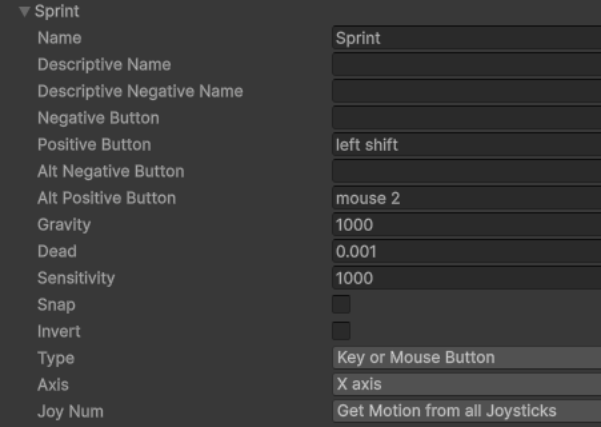
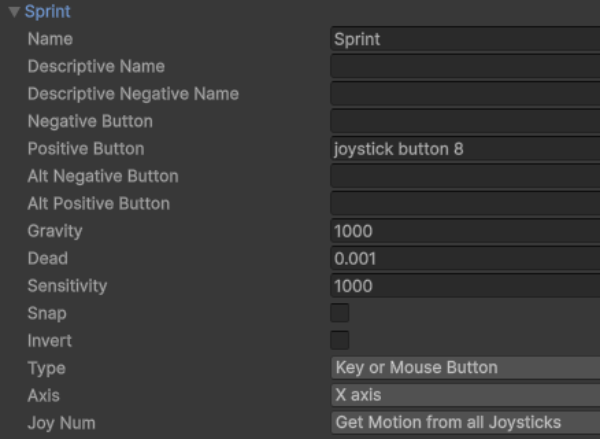
Both “Jump” and “Fire2” are already preconfigured in Unity 6. Next we will see how to configure “Sprint“:
First, let’s open Unity’s “Project Settings” (Edit → Project Settings).
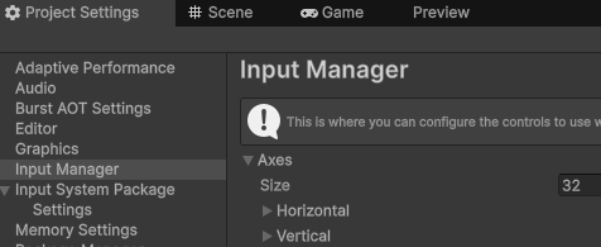
In “Project Settings“, click “Input Manager“. Within “Input Manager“, find the “Size” parameter and change the current value to add two more units. That is, if the current value is “30“, change it to “32“. This will create two more items at the end of the list, which will be used to configure “Sprint.”
We will call both elements “Sprint” and each one will have the following configuration:
2.3 Final adjustments.
Before testing our game, you need to assign the required components and layers to the “PlayerController” component as we did in the previous tutorial. You also need to add more obstacles of different sizes to allow you to use the new abilities. So, “Get it done!” 😀
By the way, don’t forget to assign the “ground3D” layer to the new obstacles so the game can recognize them as objects on which special abilities are activated.
Yes, the moment has arrived, press play and enjoy your first supercharged 3D game 🙂 !
Exercises.
To reinforce what you have learned, it is necessary to practice it, so try doing the following exercises:
- Modify values in the “Player Controller” component to make your character move faster, jump higher, and land slower when gliding.
- Modify values in the “Cinemachine Orbital Follow” and “Cinemachine Rotation Composer” components found in the “FreeLook Camera” object to experiment with different approaches to your third-person camera.
- Create a new scene with many types of obstacles so you can test all the skills like in “The Platformer Games“.
- Create more elements within the “Input Manager” to modify the game controls (for example, allowing you to glide using a button other than the jump button).
This Unity Tutorial ends here. We hope you found it helpful and that you’ve created “Your First 3D Game“.
Unity Tutorial: “Your First 3D Game“
1. Making a 3D Game
2. Supercharging the Game
See more Tutorials
This Tutorial was useful to you?
¡¡Remember, Ads Help Us Maintain this “Great Site” 😀 !!